All posts by Technomancer_Ral

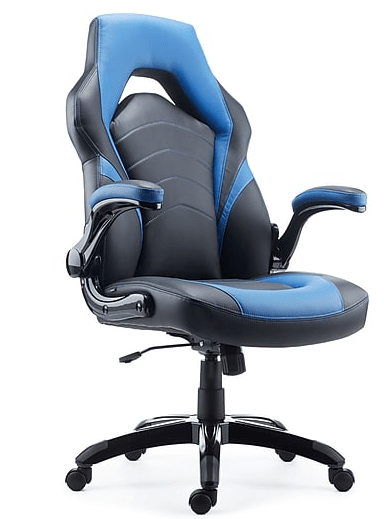
New Chair o’Gaming

My old throne was getting rather worn.. to the point that it was shedding little bits of material all the time, making my floors look dirty and making me feel like I was taking terrible care of my place.

So I finally upgraded.  I wanted arms that could flip up so my chair would fit better under my desk or to the side when I’m setting up for VR.

My hope had been that I could use the mounts I had 3D-printed for the HOTAS setup on this chair.  Sadly, they don’t fit, and I’m not going to ruin my chair by trying to force them.  I’ll have to look into alternate arrangements.  The adjustments and the arms on the chair make using the HOTAS on my desk a gain look promising, as I can slide closer without the arms interfering.

For anyone who wants to know, the chair comes from Staples.  It comes in 4 color options: blue, red, green, and gray, and they are all currently $100 off online ($70 off in store).

Staples Gaming Chair

Standard Disclaimer:  None of the post was sponsored by anyone.  I just like this chair.
Spirit Halloween Ghostbusters

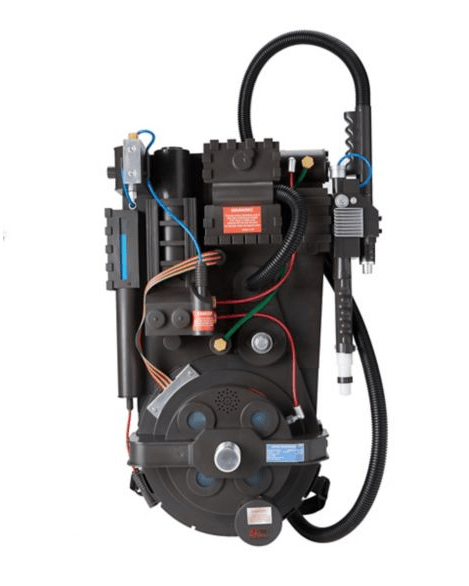
Last year, Spirit Halloween finally got around to making the Deluxe Proton pack.  Which, of course, I snapped up.


deluxe_proton_pack.png

It’s not quite full scale, but it’s definitely a more affordable entry into Ghostbuster costuming than had been available in the past.  Also, lightweight, and pre-assembled.

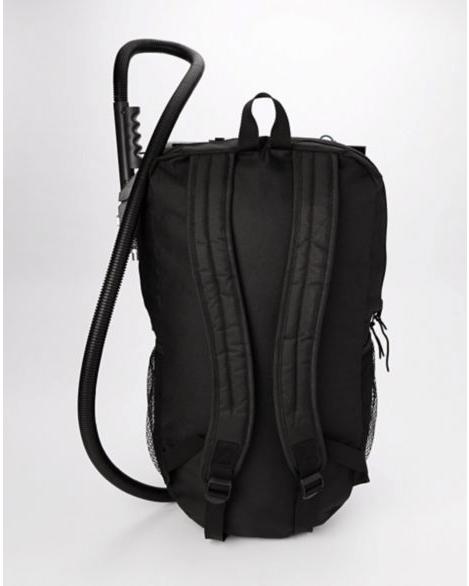
This year, apparently Spirit Halloween got the message about Ghostbusters still being popular, and drastically exploded the available gear, and addressed an issue that comes up for cons and Halloween.  How do you wear the cool backpack and carry other stuff too.  Ba-bam.  Spirit Halloween, by way of Spencers, presents:

new_proton_pack.png

A proton pack with an actual backpack built in, with much-appreciated better straps.  It’s the same shell (with small tweaks), but you can actually carry stuff in it.

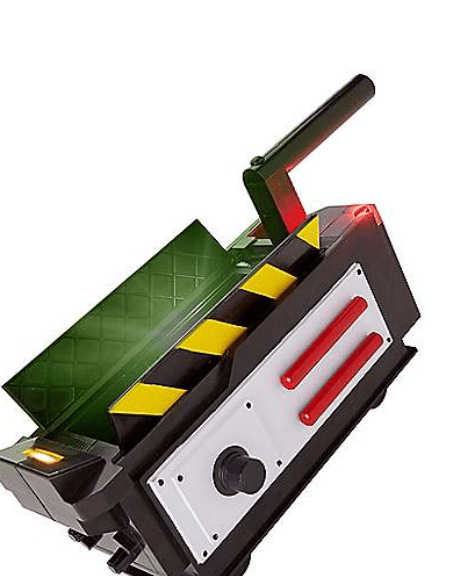
The lineup this year also includes some important accessories, the PKE meter, ecto-goggles, and the ghost trap!

pke_meter.pngecto_goggles.pngghost_trap.png


So, this jumpstarted me finally getting around to building the Ghostbusters costume I’ve always wanted.  A lot of the stuff is still on the way, and I’m really excited.

The pack and the trap have already arrived, and I’m pretty happy with them (though I’m already getting some ideas for upgrades/modifications.

This does present a bit of a quandary, though.  How do I store/display this stuff when I’m not using it.  The pack was easy to figure out.  There are command strip wall hooks that are rated for enough weight for the pack.  The trap is a bit harder if I want to put it on the wall in a way that I can quickly get it back off again.  I’m considering getting some calipers out, and designing a holder for it that will also use command adhesive strips.


At any rate, this is the year I’m finally doing it!  Finally gonna get my Ghostbuster costume together!


Disclaimer:  None of the post was sponsored by anyone.  I just really like this stuff.


VR Chat Fix

I feel like an idiot right now.  I’ve had trouble for months getting VR Chat movement to work for me consistently.  I kept having an issue with erroneous movement, with my character often running backwards continuously and for no apparent reason.  My search terms for support didn’t turn up anything useful until tonight.

And it was really obvious.

Support Article

I leave my HOTAS controls plugged in all the time, and one of the throttle axes never quite zeroes out, as I never took the time and didn’t have the knowledge to zero it out.  However, I unplugged those controls, and VRChat now runs fine, at least as far as movement is concerned.  The game crashed on me a second ago due to someone overloading the Hub with effects from their character.

Blue Screen Blues

So, lately I’ve been getting a Blue Screen of Death intermittently while playing my VR games… which is more disconcerting than usual because suddenly your vision gets weird, and then you go blind.  Well, the screen in the headset turns off, anyway.

I’m not sure what the specifics of it are, though I’m wondering if it’s related to the SSD that I installed a while back and moved my VR games to.  Most of my non-VR applications on my computer aren’t installed on that drive, and I only seem to get the blue screen when when in VR.  I also recall seeing some waning about memory errors recently.

Hopefully I can figure out what’s going on and adjust.  I don’t wanna have to get a new computer anytime soon.  In the meantime, I’m running whatever diagnostics I can find that seem related to system maintenance.

Broken Belt Retainer

I tried to tighten the y-axis belt a few weeks ago, then found out in my first test print after maintenance that something wasn’t quite right, because it failed before the first layer was finished, and slammed back into the y-axis stop.

I was busy for a bit, then finally got around to trying to fix it today, and maybe complete some other maintenance on my printer that I’ve been needing to do for a while, but had never done.  I found out that one of the screws wouldn’t tighten on the belt retainer, and thought I had somehow stripped the screw/hole.  It was at a weird angle and I was tired of bending so much to get to it, so I took the whole assembly off the printer and started looking at it. Just so I had a better idea of what was going on, I tried to back out the other screw on that retainer so i could maybe look at it from the other side, and then I saw that the retainer rotated in a way I hadn’t expected.  I flipped it back over, and saw what you see in the picture above.  That’s a different problem than I had expected.

I’ve contacted CoLiDo, and I’m hoping they can ship me a replacement part and instructions on how to install it.

Red Dragon Inn Expansions: Tavern Crew and Munchkin

Two of the Kickstarters I funded came in recently.  I’m a huge fan of the Red Dragon Inn series of games.  The most recent kickstarters were for adding the crew of the tavern, and a crossover with the Munchkin universe.  Red Dragon Inn 7 adds the wench, the barkeep, the bouncer, and the stablemaster to join in the fun of the evening.

cd977019e801d334b9badb4a92efa555_original.pngThe Munchkin expansion adds Spyke and Flower, the characters from Munchkin.  They’re here to fight monsters, get treasure, and drink everyone under the table.

9d470cd1e2bc6620b0fd06a814f4054f_original.png

It’s looking like I’ll be able to have one of my game days this weekend, and I’ll get to try them out!

Tap Strap


I came across this device the other day when browsing technology for potential use.

TAP

From what I’ve read, it’s a wearable keyboard and mouse that you wear while tapping your fingers or dragging your thumb across a surface to type or move a cursor.  For most of the applications they demonstrate it for, I think I’d rather use a real keyboard or use an on-screen keyboard.  I could see this being useful for people using an augmented reality display, though, which was the use case I was looking at.

However, they really need to make videos of people who are more proficient with it.  Typing looks painfully slow for normal use, and I think part of that is that the people in the videos don’t appear to be very proficient with it.

Dungeon Crawl Classics

I played my first game of Dungeon Crawl Classics today.  Fun times… and a lot of dead PCs.  I went through 5 level 0 characters today.

Dungeon Crawl Classics

DCC has a very old-school feel.  You roll all your stats randomly.  In order.  Including your character’s occupation.  Non-human races are the classes.  Dwarves are dwarves, elves are elves, halflings are halflings, and humans are the other classes.

You start with multiple level 0 characters… because most of them are going to die.  The character is a 0 level commoner, coming from all manner of various peasant backgrounds.  My first fatality occurred before the character even got to take a single action!  Once you have a character get to 10 xp, and you finish and adventure and return to town, THEN they get a level and train up in a class they qualify for.

So far I have one character still alive and with enough XP… mostly by virtue of staying in the middle/rear of the party.  I’ll have to finish the adventure with their life intact for them to ever get to first level.  I’m excited to see where this game goes, my schedule permitting.

VR/AR

So, I kept getting spammed with this item on Facebook (it apparently knows me well).

Spatial

I’ve also been watching videos similar to this one (I’m having trouble locating the original).

It made me wonder:

Could we combine these tech (and a lot of coding) to make an augmented reality collaborative workbench that splices AR and VR?


Steps in the process as I see it:

Rig a portion of a workbench to create realtime 3D tracking of the contents of a given area.

Show the 3D representation of that area in a collaborative VR workspace (example: VR Chat)

Avatars in VR chat point at various details on the items on the workbench.

The Spatial screen system renders their avatar’s hands on the workbench in their relative positions/orientations.

Based on the video above, you may also allow them to demonstrate assembly procedures with renderings of other parts.


A standardized version of this would allow you to get useful help from other makers at other locations while working on your projects.

Snapmaker

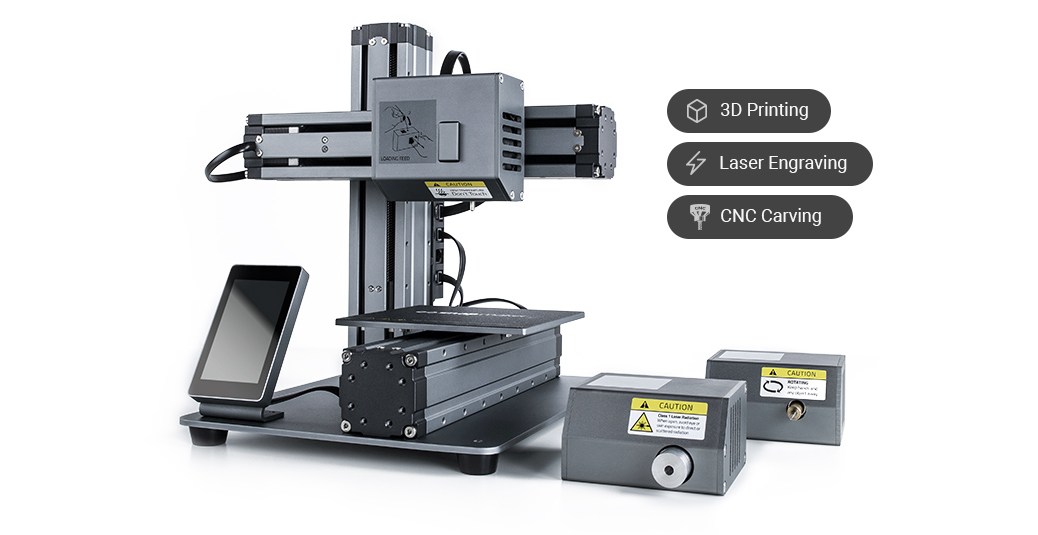
The Snapmaker is a 3D printer that recently came out of a Kickstarter, and is now available for purchase off-the-shelf.  I’ve had my on it for a while… but it appears I haven’t posted about it on here yet.  So here goes!

Snapmaker

It’s a 3D printer, laser engraver, and CNC miller all in one machine!  You can snap in and snap out the interchangeable manufacturing heads, depending on which one you want to use.  It’s a bundle of 3 different machining systems commonly found in Makerspaces, and should be great for those of us who don’t have the space and money to get all of those.  It’s got a full metal frame, and the modular design allows for it to be reconfigured and upgraded with parts that they will be adding later.

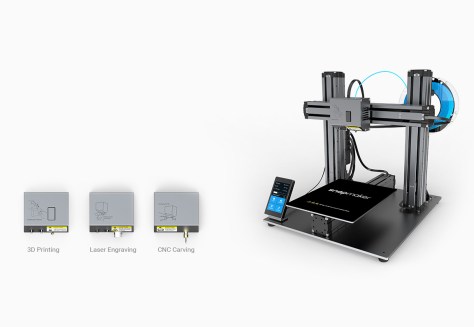
The featured image shows the current iteration, but they’ve got a few others they have shown that they are planning for down the road.  Personally, I’m waiting for what I believe is called the Snapmaker Pro (I got the name from a page that I’ve had trouble tracking down again, but it’s not listed as such on the main site).  It has a two vertical column design, which I think should be more precise and stable, and a larger production area.  I don’t feel like downsizing from my current print area available on the Colido DIY.

snapmakerpro

I contacted the manufacturer to see when this would be available, and they said it would be towards the end of this year, so this might be a Christmas present to myself!

Not sure how I’m going to handle ventilation with it yet (particularly with the CNC aspect), but I’ve already got a couple project ideas.  Hopefully I won’t meet with a terrible fate in the process…

200px-MM3D_Happy_Mask_Salesman_Artwork.png

I think it’d be fun to do a cosplay of the Happy Mask Salesman… with actual wooden masks.