Nostalgia VR: SEGA Mega Drive & Genesis Classics

I just found out that there is a way to play old SEGA games as if it was on a console in VR… and it’s on sale on Steam right now.  This brings back memories of hanging out at my friend’s house as a kid.

… and I’m apparently not much better at Sonic 2 now than I was then.  In fact…I’m probably worse, as I’m kinda abusing a feature they included that allows you to rewind or fastforward play of the game, so if you screw up you can undo your mistake.

Yeah, I know it’s cheaty, but it’s built right into the game.  And it’s hard to keep from sliding to your death in these older games.  I never did spend quite that much time with consoles to be familiar with it.

D&D AL Tips Part 3: One-Time Prep

One-Time Homework

Know Your Character Sheet

Take the time between to learn where things are on character sheets.  As long as you are using the same format character sheet, no matter which character of yours you are playing, you should know where to look when the DM asks for AC, initiative, your scores, your modifiers, your attack rolls and damage, etc.  You don’t by any stretch of the imagination need to have the contents of the sheets memorized, but you should take the time to learn where to look.  Knowing where to quickly find information is just as important if not more so than knowing the information itself.  I’ve covered these parts in a separate post; link is below.

Get To Know Your Character Sheet: Overview


Read Chapter 9: Combat, in the Player’s Handbook

This section of the rulebook is applicable to all players and the DM.  This section of the book covers most of the generic elements that you are going to be doing in combat, or at least the general mechanics of them.  Actions, bonus actions, movements, reactions, etc. are covered here.  Information relating to the specifics of spellcasting are in Chapter 10.

While I’m on the subject, turn to page 195 in your Player’s Handbook.  Please.  Look in the lower left corner, and read the section on Opportunity Attacks.  Come back to my blog post when you are finished.

Done?  Good.  Now read it again, please.  I don’t know how many times I’ve seen this one misused or misquoted. We all tend to remember simplified versions of rules as they were first explained to us.  I’ve seen a lot of people (myself included) who had a rule told to them at the table, explained as it pertained to the specific situation at hand, and then misapply that to other situations because they hadn’t ever read the actual rule themselves.


Spellcasters, read Chapter 10: Spellcasting, in the Player’s Handbook

Spellcasters, you really need to read this section once.  It explains how magic works.  Components required, casting times, preparing spells, rituals, etc.  It’s not that long of a chapter, and you don’t have to memorize it, but if you don’t read it you’re going to keep butting heads with your DM as you attempt to do things that aren’t legal in D&D.

Now, turn to page 202.  In about the middle of the page, there is a section labelled Casting Time.  Please read this section now.  Please read the Bonus Action subsection again.  This one trips a lot of us up.  It seems that everytime I or someone else at the table tries to quote it, we get it wrong in mechanically significant ways.


Read the Adventure League Player’s Guide

Each season of D&D Adventurer’s League they update the rules that exist solely for Adventurer’s League.  The main rules for players are currently 4 pages long.  Please read them before playing.  This cover the basics for Adventurers League.  If it doesn’t answer your questions, the FAQ and the Dungeonmaster’s Guide to Adventurers League are also available for free online.  Feel free to ask questions, but you are expected to at least read the player’s guide at some point.  I recommend printing it out and carrying a copy with you for reference, since it’s so short, but be aware that it will change periodically.  They can be found here:

Adventurer’s League Rule Pack


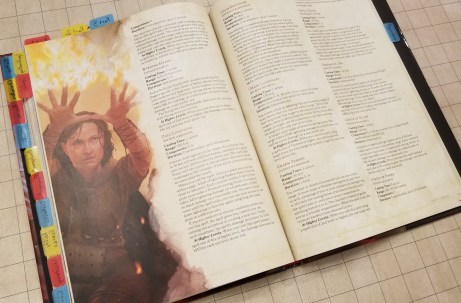
Tab the chapters of your Player’s Handbook

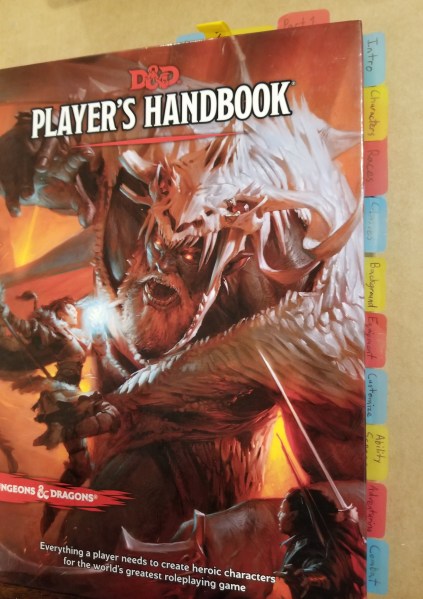
Few things are more frustrating than having to stop a session for a few minutes to look up a bit of information.  I find that putting easy to use, labelled tabs on my player’s handbook greatly speeds up my ability to find information.  I put tabs on each chapter on the side, and occasionally I’ll put temporary ones at the top of the rulebook for things that I use frequently, such as the wizard class section when I’m playing a wizard.  Tabbing the rulebook isn’t a requirement, and is usually considered above and beyond the normal prep expected, but being able to quickly find information can be almost as good as already knowing the answer.  We can’t all have photographic memory.  I’ve found this so useful that I’ve tabbed ALL my rulebooks this way (YMMV on the other rulebooks, they aren’t all as neatly delineated as the player’s handbook).

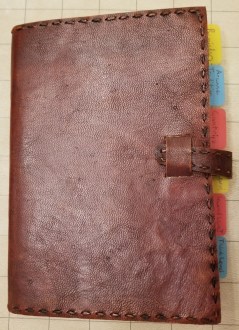
Tabbed Book

Get To Know Your Character Sheet: Overview

Knowing where to find information quickly on you character sheet is vitally important.  I highly recommend taking a bit of time getting familiar with where things are located on character sheets, so no matter which character you play you can quickly get to slaying goblins rather than get lost on the way to your combat stats.  I was originally going to include this as a portion of D&D AL Tips Part 3, but it was making the whole post too long.  That post will include a link back to this one for reference.

Here’s the character sheet as a whole, so you can find your way around my cropping in the later sections.

Character Sheet Image.png

Note:  Particularly with Adventurers League the top of the page will change visually from sheet to sheet as the seasons progress, but the location of the information should remain the same.

General Information

Location: Top of the page

General Information.png

This section gives the basic identity of your character; name, class, level, background, race, and alignment.  The information people usually want to know when you introduce the character.  It also includes a space for player name and a spot for tracking your experience points (note: in AL you mostly keep track of your experience on your logsheet).

Ability Scores

Location: Left edge

Ability Scores.png

This is where the 6 basic stats are kept.  If the dungeonmaster calls for an ability check, this is where you look.

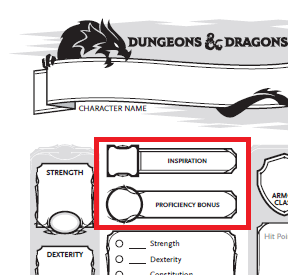
Inspiration and Proficiency

Location: Upper left, just to the right of the ability scores.

Inspiration and Proficiency.png

You can mark whether or not you have an inspiration use given from the DM.  You can only have one at a time.  The proficiency bonus is a stat that slowly changes as you level, and factors into everything you have proficiency with (specific saving throws, skill checks, attacks, and spellcasting).  If you’ve kept your sheet up to date as you level, you won’t normally have to reference it at the table.

Saving Throws

Location:  Left side, just to the right of the ability scores and below the proficiency bonus

Saving Throws.png

Anytime a trap gets triggered, and often when a spell is cast on you, you’ll have to look here for your saving throws.  I hope you roll well, because if the DM is calling for one of these, a failure usually means more pain for your character… or the party at large if something is trying to control you.

Skill Checks

Location:  Left side, below the saving throws

Saving throws and Skill Checks.png

These are going to get referenced a lot.  Anytime you do that has a chance of failure, other than an attack, will use one of these scores.  Note that at the bottom there is a specific blank for your passive perception.  The DM will often ask for this at the beginning of the session, so they’ll know whether you notice things if your character isn’t specifically looking around at a given time.

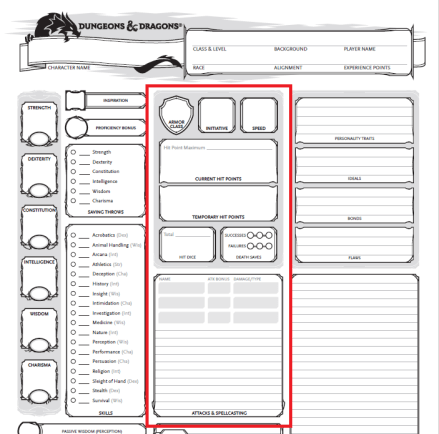
Combat

Location: Center of the page

Combat.png

This section is in the center of your character sheet for a reason, as you are going to use it a lot.  A lot of players seem to get lost trying to find information in this section, so I’ll probably do another mini article on it at some point.  Generally, though if it’s combat related , it’s in the center.

Your attacks are in the box at the center of the page.

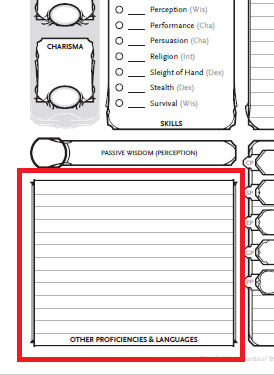
Other Proficiencies and Languages

Location: Bottom left corner

Proficiencies and Languages.png

If the DM asks if your character knows certain languages, or is proficient in various armors, weapons, tools, or vehicles, it will be listed here.

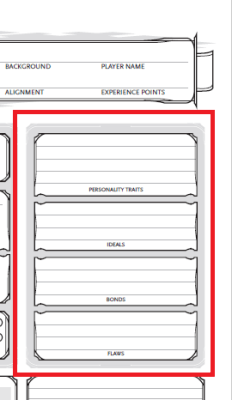
Character Traits

Location:  Upper right, just below the general information

Character Traits.png

These are here mostly for roleplaying purposes.  They have no direct mechanical effect on gameplay or rolls (at least in Adventurers League), but DMs sometimes hand out inspiration if you do things that particularly adhere to these traits.  This is here so your characters have more life and personality at the table, instead of being cardboard cutouts with stats.

Note:  If you play at a non-AL table, DMs may factor these into the gameplay more, and start wrapping parts of the story elements around the various characters’ character traits.  I’ve known some to use the flaws section against you… which can be highly entertaining if done well.

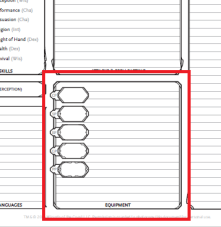
Equipment

Location: Bottom center

Equipment.png

At least when you first make your character, all equipment you are carrying should be listed here.  I highly recommend getting or making a separate inventory sheet.

Features and Traits

Location: Bottom right corner

Features and Traits.png

This is where all of your class abilities should be listed.  I highly recommend listing the book’s abbreviation and page number for each one, as a lot of them are too wordy to write out here.

D&D AL Tips Part 2: Between Sessions

This section is focused on recommended time with your character sheet between sessions.  As you gain experience (as a player, not as a character), you likely won’t need to spend quite as much time on this, but you should still probably check back on these every so often, particularly with:  new characters, levelling up, and coming back from a long absence.

Note:  Some of the notes I’ll make will refer to using the rulebooks under the assumption that you have your own.  I understand that not everyone can readily obtain their own copies of rulebooks, particularly when they are deciding whether they like the game.  If you don’t have your own rulebook, I recommend doing what you can to arrive early and go through these steps by asking to borrow a book from one of the other early arrivals at the table until the session gets going.  I’m making a note here so I don’t have to keep repeating myself.

Between Sessions:

Take Time to Learn Your Character

Take time to look over your character’s abilities and make sure you understand how they work.  If you have questions, write them down and ask the DM for clarification after you’ve tried to look up answers for them in the rulebook first.  If your group has a discord or other way of communicating out of game, ask on there between sessions if you can.  I hesitate to recommend using sources further from the table, as some are good and some are full of bovine excrement.  Overall, remember Rule Zero: the DM has final say and judgment about the game they are running.

For a lot of abilities that would be tedious to write out in the abilities section of the character sheet, I recommend reading over the full ability in the book, and marking your character sheet with the ability name, book it came from, and page number.  ESPECIALLY if you are using a +1 rulebook to go with the standard PHB rules for characters.

Spellcasters, Prepare Your Spellbooks

I HIGHLY recommend that you find or create a reference for your spells if you play a spellcaster. And have that reference open to the correct spell BEFORE your turn comes around.  Waiting for people to look up spells after someone has already said what spell they plan to cast drives the rest of the table bonkers.  Starting out, I highly recommend keeping a copy of the Player’s Handbook nearby when gaming, so you don’t have to hunt down a book in the middle of the game.  Lately, I mostly use the spell cards Wizard’s of the Coast makes for convenience (though they are frustratingly expensive).  In some cases I go a bit overboard, trading time in place of money.  I wrote my current character’s spellbook out, only writing down the spells the character had and keeping them sorted by spell level.  If you build your own reference like I did, I highly recommend keeping notes for the correct book and page number.  There are often times when the DM will call into question the exact wording of a spell description and ask you to look it up in the official rulebook.

Normal Wizardry:

normal wizardry.jpg

Expensive Wizardry:

expensive wizardry.jpg

WHY DO YOU DO THIS TO YOURSELF?

spellbook.jpg

spellbook3.jpg

Keep Your Character Sheet Up To Date

If your character is supposed to level up, make sure you level it up between sessions (if possible) so you don’t lose valuable play time to level your character.  This is a lot more flexible in homebrew, but in Adventurer’s League we’re on the clock, particularly with Season 8’s rules.  Also, game stores throw us out at closing time.  Their employees need sleep too.
Oh, and make sure your inventory is right.  I’m banging my head against a wall myself for not having kept some stuff up to date as I went along.  I was recently trying to make sure my character stable was ready for the next game night, and I didn’t appear to have transcribed some of the inventory from the logsheets to the actual inventory page.  D’oh!

Reflect on the last session

This feels a bit odd to put in here, but I recommend thinking about the last session at some point before the next one.  What worked, and what didn’t work?  If there were player/character conflicts at the table, think on why they happened, and if there is anything you can do to resolve it or work around it.  I won’t harp on this too much, but I think it can be productive to at least think about sessions in between.

Examples:

Someone with a low AC was ambushed from behind.  Would changing the party marching order help?

The party was blindsided by a trap.  How could you increase your chances of finding and disabling that kind of trap in the future?


Spending a little time between sessions helps us all maximize our gaming time, and reduces headaches.

D&D AL Tips Part 1: At the Table

A lot of people, myself included, started playing Dungeons and Dragons Adventurers League for a somewhat low-pressure, drop-in drop-out roleplaying experience.

Wizard’s of the Coast provides resources for it here.

For new and old players alike, here are some recommendations for players to keep the game fluid and moving.  I’d call them “my” recommendations, but as is the nature of the hobby, this is a mixture of things from my experience and things I learned from others, whether at the table or through online media and interactions.  It’s okay if you don’t get through all of this in the first few games, but I highly recommend going through this.  It will make your gameplay smoother… and reduce the grumblings of the grumpier older players at the table (sadly, myself included in this).  I’m breaking this into a three part series, starting at the table, where your actions have the most immediate impact.


Part 1: At the table:

Pay attention to the other players’ actions

I know this can be difficult, particularly in large groups, as it takes a while to get through initiative back to your turn.  If someone has to keep recapping what has been going on, it just gets longer.  Also, players will sometimes announce try to position themselves tactically, creating openings for you to exploit.  Someone might try to set you up for a flanking attack for advantage for both of you, but if you don’t hear them announce that or don’t notice it, you might miss it.  While you are watching, be thinking of what actions you are likely to take on your next turn, so you are ready to go when your initiative comes up.


Roll attack and damage dice together

If you plan to attack on your turn, make sure you know what your attack roll and damage roll stats are.  Go ahead and get the dice out for both before your turn.  Grab your second D20 for advantage if you would have advantage on the attack.  Have this ready before your turn if possible.

I know this seems weird, and I’ve been told it seems presumptuous, but it really makes the game go faster to roll the damage with the attack.  It forces the player to have their whole action ready.  I’ve seen a lot of little increments of time get wasted in the “stumble,” where players roll their attack, have to be reminded of their damage roll, have to search for the correct dice, and then find their modifier again.  I see this most often with newer players, but it also trips up veterans.  By getting out your damage die at the same time as your attack die it forces you to mentally “preload” your action by looking at your stats in advance, so you know exactly what to roll.  Heck, keep your finger on your attack stats if it helps you.  That way you are ready to go on your turn, and can get right to the action!

dice


Have your spells ready

If you plan to use a spell, look it up before your turn.  Have your reference material or rulebook out to the spell you intend to cast before your turn.  Glance over it.  Know what you are planning to do before your turn.  Look up the relevant spell save DC or attack modifier, and get your damage dice out.  A lot of gameplay time is lost from spellcasters having to look up their spells and it taking forever.  I used to be (and still occasionally am) that guy myself, driving my table nuts trying to find the spell description.  If we think ahead, we can light the room up with our fireballs quickly, adding an explosive demonstration of ULTIMATE MAGICAL POWER (MWAHAHAHAHAHA), rather than “um… how does this spell work again?  Give me a minute to… oh, wrong book, hold on!”

Fireball.jpg

ULTIMATE ARCANE POWAH!

Unprepared Wizard High.jpg

“I’ve almost got it.  Guys?”


Keep Your Logsheets Up To Date

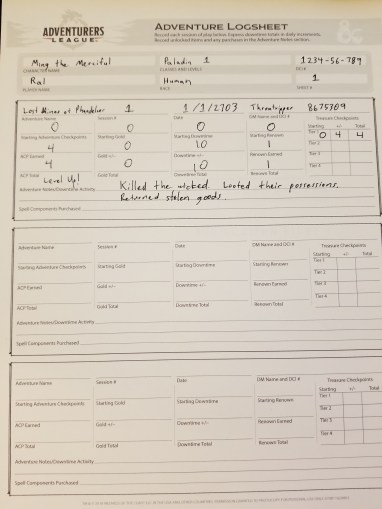
This is adventure league.  In the name of fair play in this format, you are required to maintain logsheets as you adventure.  Blank logsheets are posted free online, and people usually carry some spares if you are new and/or you forget to keep enough on hand.

Go ahead and fill out your log throughout the gameplay session.  Note any instances of money or items gained or lost in the notes.  In particular, update the rewards at the end of the session.  As you get more experienced you may pick up on things you realize you’ll need to remember later, so write those down too.  Odds are you’ll forget what you were supposed to have if you leave the game table before filling out the sheet and have to figure it out the next week.

There is a lot of information that is asked for, but a lot of it is simplified in Season 8.  The rewards are listed in the Player’s Guide for Adventurer’s League, unless the DM specifies otherwise.  As usual for most things D&D, ask your DM for help if you have any questions.  An experienced player may also be able to help you.

20190304_213956.jpg

Justice is served.  And logged.


Next time is Part 2: Between Sessions

My First DRD: Roomba 690

A few weeks ago, I noticed that it was bugging me that the floors in my home were getting dirty.  I could swiffer and vacuum, but my energy was flagging, and I need to be mindful of when I vacuum so I don’t disturb the neighbors with my occasionally odd hours.  So, in true technomancer fashion, I delegated… and got a robot to do it.

Roomba 690 on Amazon

This vacuum uses multiple methods (sweeping, brushing, vacuuming) to clean my hardwood and carpet floors.  I still think the carpets could use some time with a real vacuum cleaner periodically, as I don’t think this vacuum is as powerful for getting stuff out from between fibers, but it definitely gets the visible dirt and small detritus without requiring me to do much more than push a button, whether it is on the Roomba itself or the app on my phone.  As long as I keep the floor picked up in my home, I can even get it to start vacuuming from anywhere I have cell service!

This thing even goes under my furniture to clean, making it so that I don’t have to move as much around or bend at uncomfortable angles to get the entire rooms.  It also came with a “Virtual Wall Barrier” tower, which makes the robot turn back before going into certain areas.  Since I only have one at the moment, I’ve set it to guard my 3D printer from being jostled unnecessarily.

Once it’s done cleaning the main room, it makes it’s way back to it’s base station and recharges, so I don’t have to go find it and plug it in myself.  When I have it clean side rooms, I have to pick it up and carry it back, but it’s still better than having to lug the regular vacuum around, and I spend less time having to vacuum it myself.  It takes longer to vacuum than vacuuming it myself, but my hands-on time is greatly reduced.

I’ve noticed that it has improved my mood to have the floors cleaned more regularly, and I feel like I’d be more confident in inviting people over for game nights on shorter notice, as I don’t have to spend a bunch of time cleaning the floors in addition to all the other chores of cleaning.  I can multitask with the Roomba cleaning the floor while I still handle the other things that require manual work (for now).

Now, if only I could find a skin to make it look like a Farscape DRD…

Monoprice Select Mini Pro 3D Printer

Last week my Colido DIY 3D printer failed again, and I got fed up with it, so I decided to order a new 3D printer.

I used the method that I’ve mentioned before in a post and recently added here:

3D Printer Shopping

I wanted a replacement printer that would suit my normal prints: small items for tabletop games.  I wanted something more reliable/easier to run than my Colido DIY.  I also didn’t want it to be too expensive, particularly as the Snapmaker 2 Kickstarter is upcoming.

After going through all of this, I settled on the Monoprice Select Mini Pro (I’ve linked to the company website, but I bought it through Amazon).  I had heard people say good things about them, and I did some poking around.  I particularly liked that it was effectively version 3 of a standing line of 3D printers, which bodes well for it having a lot of the issues worked out.

Here’s what I’ve noticed so far:

Calibration:

This printer being preassembled and precalibrated is working out really well so far.  I’ve been getting better print quality and consistency with this printer than I did with the Colido DIY that I built myself.  I’ve been able to print things I wouldn’t have dared attempt on the old printer, partly due to quality issues, and partly because the printer had the tendency to fail catastrophically in a couple different ways.

The self-levelling feature saves me a lot of effort trying to figure out how to adjust the printer.  No more turning the z-axis direct drive screws and setting the z-axis stop screw.

Bed:

The metal print bed is rigid and coated, so it should be less prone to gouging and possible warping than the plastic bed I’m used to.

Unlike the previous printer, this one has a heated print bed, which I’ve had no prior experience with,  This will be a learning experience, and broaden my knowledge base.

This bed being coated means I’m not going to have to keep maintaining a layer of painter’s tape.  However… it might be holding too well.  I don’t know if I’ve got something set incorrectly, but it is really difficult to remove prints from the print bed, even with a raft attached.  I’m asking questions in some 3D printing circles to see if I can make it release easier.

Bowden Tube:

I’ve never used one of these before.  This is a tube that directs the filament in a more consistent manner to the print head.  I’m still unsure how I feel about this thing.  I worry that it’s adding another location that could get clogged.  It does make it so that I don’t have to worry about where the path of the filament is too much.

Wifi:

This thing is wifi-enabled!  I don’t have to carry a flash drive or SD card from one room to another to print files, though there is still the option for micro-SD cards and plugging a computer in via micro-USB.  I can even set the extruder and bed temperatures remotely, and tell the printer to print the file after I transfer it over the wifi.  I will note that I’ve had some issues with failed file transfers, which requires power-cycling the printer itself, and reattempting the transfer until it works.  It’s annoying, but not a huge issue so far.  Hopefully a firmware update will help with this.

Be careful to make sure there isn’t something already on the printer when you transfer a file.  Sometimes the printer appears to start a new print as soon as you transfer the file, without clicking the Start Print button.

Headless printing:

This thing can run itself entirely independently, without needing a computer attached to it.  This alone has drastically improved my setup, as I don’t have to have a computer within cable reach of the printer.  No more worrying with an old laptop!

Since there is no computer directly plugged into the computer, you use the onboard touchscreen to control the printer (unless you want to plug a computer in, but that is optional).  This touchscreen can be a bit finicky, but it is nice being able to give commands directly to the printer.  However, there are a couple issues:

  • When a print is finished, the button to return to the main screen is NOT visible.  You need to tap on the right side of the screen, and you will find an invisible home button.
  • PRESSING THE PAUSE BUTTON DOES NOT IMMEDIATELY PAUSE THE PRINT. So, watch out for that if you are trying to stop in an emergency.  You might need to kill the power with the switch on the back of the printer.  So far I’ve only needed to use it once, when I accidentally triggered a movement sequence while there was a print still on the printer.

Slicing:

Slicing software comes with the printer.  It was Cura, if I remember correctly.  However, I use Simplify3D, and they already have a profile from previous iterations of the printer!  I’m continuing to use it to slice my files, and this time I’m trying to apply some lessons learned from previously,  I’m making different printer profiles for different PLA filaments, since they have different temperature ranges.  I used to use one profile for all, and that caused issues with prints because the filaments that you would think only differed in color would not behave the same for the same temperatures.  I’m building these profiles as I go along, based on my tweaks on the default settings for this printer.


Summary:

Overall, this printer appears to be a vast improvement over my previous one.  I think this one might even be stable enough to let it print semi-unattended.  The print quality seems so much higher that I might even be able to start printing more standard-style minis, once I tweak a bit more.  It could use a more detailed manual, though.  It’s rather short, and I’m having to poke around various sources for guidance.

3D Printer Refresh

Earlier this week when trying to print another mini for D&D, I made the mistake of leaving the room before it started the first layer.  As it occasionally does, the Colido DIY that I have went past the endstop switch, and gouged the print bed, getting the nozzle stuck in one of the screw holes on the printing bed before I could get to it to yank the power breakaway cable.

I got fed up with the printer.  I can probably still fix it as I have before, but as far as I’m concerned I’m done with this one.  I ordered me a new printer which arrived today.

I ended up getting a Monoprice Select Mini Pro 3D printer, based on using a tool I’ve mentioned previously to find something that fit my criteria.  It’s got a much smaller print volume, but it comes preassembled, precalibrated, has a heated print bed, is self-levelling, and is wifi enabled.

I’ll probably go more into this 3D printer at a later time, giving my review of it so far… especially after I get it fine-tuned.

Suffice it to say, I was tired of running a printer I didn’t feel I could trust, and it was time to get a new one.  As I’ve mentioned before, I eventually want to get the Snapmaker 2, which will get me back up to the larger print volume and expand my manufacturing capabilities, but I needed something in the meantime that wasn’t too terribly expensive.  Most of what I print are small miniatures for D&D games, so I’m not really giving up much except the occasional larger print item that I rarely do anyway.  I’ve currently got one of the provided test print files running on it, and I can already tell you that this printer is much quieter than the last.  I can’t hear it from my computer room like the other one.