All posts by Technomancer_Ral

3D Printing and Postprocessing Safety

You should follow some basic safety precautions when dealing with 3D printers, and there are more advanced ones for further risk reduction that is particularly important if you aren’t going to monitor your prints closely.  I must note that most of my experience and the related reading I’ve done are related to Fused Deposition Modelling (FDM), which are the printers that use an extruded plastic filament, so there are probably other safety precautions I am ignorant of for other printing methods.  If you use something other than an FDM printer, I highly recommend doing your own research to find the to safeguard yourself and your printing area.

I must also note that these are aimed at safety, and will not guarantee you don’t have spectacularly failed prints, but will reduce the risk of property damage, injury, or death (before you get scared and put off 3D printing, I’m not sure that last one has ever happened, but it’s technically possible).


Monitor your printer:

You should watch or at least check on your 3D printer periodically while it’s printing.  This helps with keeping your prints from failing spectacularly, and helps you recover for a new attempt at a print faster after a fail, but this is also important for safety reasons.  Monitoring your print ensures that you are more likely to catch any potential fire or other safety hazards before they can cause a problem.  How frequently you need to check on it depends on the quality of your printer, your experience, and the environment you are printing in.  A quality printer in a safety-conscious workspace may not require as much monitoring as a DIY kit in a household with children and pets.

Keep Clear of Hot Nozzles:

FDM printers run by forcing plastic through a hot metal nozzle to make it melt and build up structures.  Keep anything you don’t want burned away from the nozzle.  These have to be hot to melt the plastic (190 degrees Celsius/374 degrees Fahrenheit or higher), so make sure you keep body parts away from the nozzle when it is hot, and make sure kids and pets can’t get too close to the nozzle either.

Take Precautions for Fire Safety:

Related to the above, keep flammable materials away from your 3D printer as much as possible.  You don’t want a flammable item to fall onto the printer to cause obstructions or catch fire.

DO NOT build a wooden support structure OR enclosure for your 3D printer.  This include particle board.  Adding such flammable materials to close proximity with your printer increases your fire risk.

Here are some good fire safety tips in general, brought to you by a person who learned from experience:

Don’t burn your house down 3D Printing. A Cautionary Tale

I recommend reading that article in it’s entirety, but the main things I’ve taken away from it and plan on implementing are: 1) keep an electrical fire rated fire extinguisher near the printer and 2) put a smoke detector above the printer.  That way you have as much advance warning as possible and the capability to put out any fire before it can endanger your home.

Here’s another article I’ve seen on fireproofing your 3D printer.  His involves some rather extreme checking and modifications, but I can see how they could help, particularly for homemade 3D printers.

Everything you need to know to make your 3D printer fireproof!

If you use a heat gun for post-processing, don’t be an idiot.  Get a trivet to put it down on after using so it doesn’t ignite anything.

Don’t Breathe Microparticles and Fumes:

Keep your printer in a well-ventilated area to prevent buildup of microparticles in the air that you can breath in.  I know the science is not definitive on whether they are harmful, but if you don’t want to take unnecessary risks this is one way to reduce them.  If a print is going to go on a long time, it is recommended that you don’t stay in the same room for an extended period of time.  Wait a few minutes after the printer finishes to let the microparticles settle.  Apparently they settle out quickly.  Then go retrieve your print.

If you use materials other than PLA, I recommend getting a fume exhaust system of some kind, as they can put off toxic gases.

Use Common Sense when Post-Processing:

I know this seems basic common sense, but general knife/blade safety is very important.  Cut away from yourself, not towards yourself.  If I were still in the Boy Scouts I’d have to have a corner cut off of my whittling chip.  I recently gave myself a jagged cut when using one of my post-processing chisels because I was careless and trying to cut late at night.  My hands weren’t as steady as I thought they were, and I foolishly cut towards myself.  Anyway, make sure you either clamp or have the piece you are working on held securely in such a way that the force you are putting into the chisel goes straight down into the cutting board.  That way if it slips or goes through easily it goes into the board and not your hand!


Comment below if you have any more safety tips you recommend to people for keeping their hobby (or possible workplace) safe.

Technomancer’s New Worktable: Mk II

I quickly tired of the clutter, and I’ve always liked toolboxes.  I found this one at harbor freight:

tool chest

Eight Drawer Wood Tool Chest

I’ve seen it before, and the wooden toolbox had always reminded me of the custom toolboxes by dad made for his tools years ago.  I like the echo in style.

It’s felt lined, and I’ve tried to arrange the drawers and their contents similarly to how I had them laid out on the table.  The most commonly used tools are closest to the work area.  Tool trays I’m likely to use around the same time are next to each other instead of stacked, so they don’t obscure each other when open.  I’ll probably be rearranging for a bit as I get used to working with it.

Despite it’s size, it’s definitely freed up work space, and I like that it’s neat and organized.  If any family visits, most of the sharp objects that could be dangerous to kids are in one spot to be locked away from curious fingers.

Also, by collecting most of my tools into one toolbox I’ve made it that much easier for me to do demos for local groups or set up a table at a maker fair.  I’ll just have to throw the rest in there, then put the the toolbox and the 3D printer on a cart and roll it in, instead of making a bunch of trips for things.  If I need to bring my table, I can do that too, since it is portable.

I think this work area is really shaping up nicely.  Now I just need to get a steady build queue going and make the most of it!

Technomancer’s New Worktable

I got tired of trying to use my coffee table as a place to clean up my 3D prints, and I’m not a fan of bending over more than I have to.  Let’s just say I’m not a skinny technomancer, and it was getting to be frustrating with my work flow.  Also, I’m tired of cleaning off my makeshift workspace every time I want to have people over.

I did some searching on the websites for Home Depot and Lowes, and found an inexpensive folding table that was adjustable to a height for comfortable working on items while standing up, and the supports on the legs are high up enough that it doesn’t impeded my ability to use the chest I’ve placed it over.  So now, I have my worktable.

new-worktable-1.png

I apologize for the image quality, but I prefer not to show more of my home than necessary online, so I’ve removed the background.  A technomancer has to be careful about how much he reveals of his sanctum!

Anyway, I haven’t yet had time to make much use of this new setup, so we’ll see how it works.  A few notes about my setup, for those who might want to set up their own workbench:

In the center-ish area is the cutting board and magnifier, since this is what everything else revolves around.  Tools are mostly placed to the left, in order of how frequently I use them, with the most frequently used tools closest to the cutting board.

The lighting in that area of my home was not the best, so I have a desk lamp with the light pointed at the work space, since that is where I’ll need the most light.  The switch for the lamp is on the cable for the lamp, so I’ve wrapped enough of the cable around the base that the switch stays in a easy reach, rather than having to duck under the table every time I need it.  Hopefully there won’t be any induced current issues.

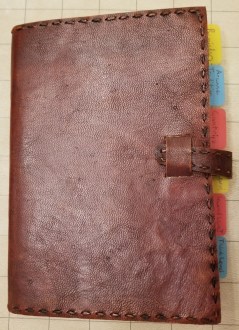
My Maker notebook is on the right.  I’m right-handed, so it’s a lot easier to write notes if i keep them on the right side of the work area.

In the upper right corner are some superglue, whiteout, and nail polish topcoat.  Glue for assembly, whiteout for either covering up mistakes on white PLA or being able to add some white to something printed in another color, and the topcoat is to seal in the ink on items that I have colored in with markers (usually my flatminis).

This is just my initial setup, and it will evolve over time.  As I’m writing this post I’m already thinking of things that I need to start storing on or near the table, and things I use infrequently enough that they don’t need to be on the table (they’re mostly there right now because I’m trying to clean up).  I’m also considering finding some sort of organizer or toolbox to more compactly store the tools within easy reach.

I am slightly concerned that this table won’t be stable enough in the long run, but I think where I’ve got it positioned against a wall should reduce any wobble.

I hope this gives you guys ideas about how you might setup your own hobby tables.

Nostalgia VR: SEGA Mega Drive & Genesis Classics

I just found out that there is a way to play old SEGA games as if it was on a console in VR… and it’s on sale on Steam right now.  This brings back memories of hanging out at my friend’s house as a kid.

… and I’m apparently not much better at Sonic 2 now than I was then.  In fact…I’m probably worse, as I’m kinda abusing a feature they included that allows you to rewind or fastforward play of the game, so if you screw up you can undo your mistake.

Yeah, I know it’s cheaty, but it’s built right into the game.  And it’s hard to keep from sliding to your death in these older games.  I never did spend quite that much time with consoles to be familiar with it.

D&D AL Tips Part 3: One-Time Prep

One-Time Homework

Know Your Character Sheet

Take the time between to learn where things are on character sheets.  As long as you are using the same format character sheet, no matter which character of yours you are playing, you should know where to look when the DM asks for AC, initiative, your scores, your modifiers, your attack rolls and damage, etc.  You don’t by any stretch of the imagination need to have the contents of the sheets memorized, but you should take the time to learn where to look.  Knowing where to quickly find information is just as important if not more so than knowing the information itself.  I’ve covered these parts in a separate post; link is below.

Get To Know Your Character Sheet: Overview


Read Chapter 9: Combat, in the Player’s Handbook

This section of the rulebook is applicable to all players and the DM.  This section of the book covers most of the generic elements that you are going to be doing in combat, or at least the general mechanics of them.  Actions, bonus actions, movements, reactions, etc. are covered here.  Information relating to the specifics of spellcasting are in Chapter 10.

While I’m on the subject, turn to page 195 in your Player’s Handbook.  Please.  Look in the lower left corner, and read the section on Opportunity Attacks.  Come back to my blog post when you are finished.

Done?  Good.  Now read it again, please.  I don’t know how many times I’ve seen this one misused or misquoted. We all tend to remember simplified versions of rules as they were first explained to us.  I’ve seen a lot of people (myself included) who had a rule told to them at the table, explained as it pertained to the specific situation at hand, and then misapply that to other situations because they hadn’t ever read the actual rule themselves.


Spellcasters, read Chapter 10: Spellcasting, in the Player’s Handbook

Spellcasters, you really need to read this section once.  It explains how magic works.  Components required, casting times, preparing spells, rituals, etc.  It’s not that long of a chapter, and you don’t have to memorize it, but if you don’t read it you’re going to keep butting heads with your DM as you attempt to do things that aren’t legal in D&D.

Now, turn to page 202.  In about the middle of the page, there is a section labelled Casting Time.  Please read this section now.  Please read the Bonus Action subsection again.  This one trips a lot of us up.  It seems that everytime I or someone else at the table tries to quote it, we get it wrong in mechanically significant ways.


Read the Adventure League Player’s Guide

Each season of D&D Adventurer’s League they update the rules that exist solely for Adventurer’s League.  The main rules for players are currently 4 pages long.  Please read them before playing.  This cover the basics for Adventurers League.  If it doesn’t answer your questions, the FAQ and the Dungeonmaster’s Guide to Adventurers League are also available for free online.  Feel free to ask questions, but you are expected to at least read the player’s guide at some point.  I recommend printing it out and carrying a copy with you for reference, since it’s so short, but be aware that it will change periodically.  They can be found here:

Adventurer’s League Rule Pack


Tab the chapters of your Player’s Handbook

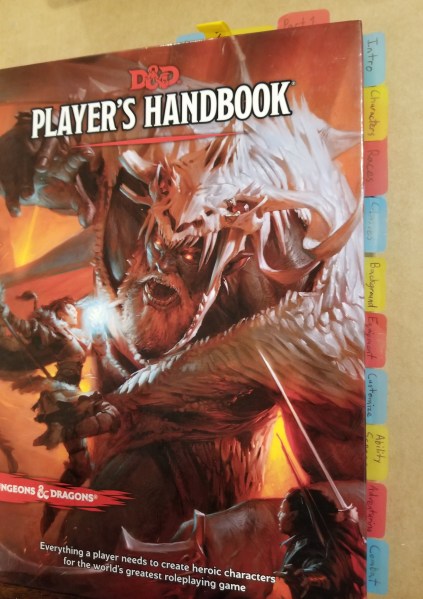
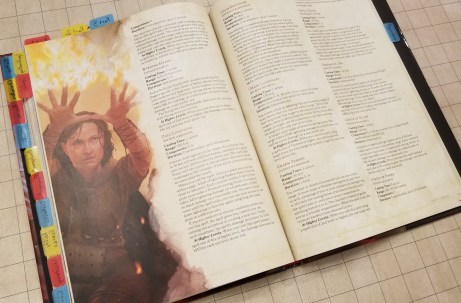
Few things are more frustrating than having to stop a session for a few minutes to look up a bit of information.  I find that putting easy to use, labelled tabs on my player’s handbook greatly speeds up my ability to find information.  I put tabs on each chapter on the side, and occasionally I’ll put temporary ones at the top of the rulebook for things that I use frequently, such as the wizard class section when I’m playing a wizard.  Tabbing the rulebook isn’t a requirement, and is usually considered above and beyond the normal prep expected, but being able to quickly find information can be almost as good as already knowing the answer.  We can’t all have photographic memory.  I’ve found this so useful that I’ve tabbed ALL my rulebooks this way (YMMV on the other rulebooks, they aren’t all as neatly delineated as the player’s handbook).

Tabbed Book

Get To Know Your Character Sheet: Overview

Knowing where to find information quickly on you character sheet is vitally important.  I highly recommend taking a bit of time getting familiar with where things are located on character sheets, so no matter which character you play you can quickly get to slaying goblins rather than get lost on the way to your combat stats.  I was originally going to include this as a portion of D&D AL Tips Part 3, but it was making the whole post too long.  That post will include a link back to this one for reference.

Here’s the character sheet as a whole, so you can find your way around my cropping in the later sections.

Character Sheet Image.png

Note:  Particularly with Adventurers League the top of the page will change visually from sheet to sheet as the seasons progress, but the location of the information should remain the same.

General Information

Location: Top of the page

General Information.png

This section gives the basic identity of your character; name, class, level, background, race, and alignment.  The information people usually want to know when you introduce the character.  It also includes a space for player name and a spot for tracking your experience points (note: in AL you mostly keep track of your experience on your logsheet).

Ability Scores

Location: Left edge

Ability Scores.png

This is where the 6 basic stats are kept.  If the dungeonmaster calls for an ability check, this is where you look.

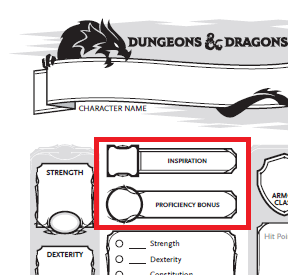
Inspiration and Proficiency

Location: Upper left, just to the right of the ability scores.

Inspiration and Proficiency.png

You can mark whether or not you have an inspiration use given from the DM.  You can only have one at a time.  The proficiency bonus is a stat that slowly changes as you level, and factors into everything you have proficiency with (specific saving throws, skill checks, attacks, and spellcasting).  If you’ve kept your sheet up to date as you level, you won’t normally have to reference it at the table.

Saving Throws

Location:  Left side, just to the right of the ability scores and below the proficiency bonus

Saving Throws.png

Anytime a trap gets triggered, and often when a spell is cast on you, you’ll have to look here for your saving throws.  I hope you roll well, because if the DM is calling for one of these, a failure usually means more pain for your character… or the party at large if something is trying to control you.

Skill Checks

Location:  Left side, below the saving throws

Saving throws and Skill Checks.png

These are going to get referenced a lot.  Anytime you do that has a chance of failure, other than an attack, will use one of these scores.  Note that at the bottom there is a specific blank for your passive perception.  The DM will often ask for this at the beginning of the session, so they’ll know whether you notice things if your character isn’t specifically looking around at a given time.

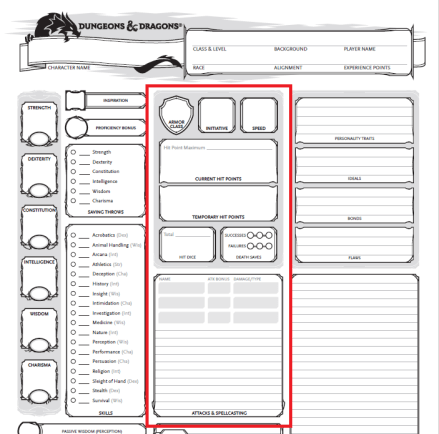
Combat

Location: Center of the page

Combat.png

This section is in the center of your character sheet for a reason, as you are going to use it a lot.  A lot of players seem to get lost trying to find information in this section, so I’ll probably do another mini article on it at some point.  Generally, though if it’s combat related , it’s in the center.

Your attacks are in the box at the center of the page.

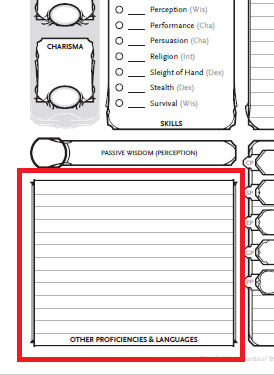
Other Proficiencies and Languages

Location: Bottom left corner

Proficiencies and Languages.png

If the DM asks if your character knows certain languages, or is proficient in various armors, weapons, tools, or vehicles, it will be listed here.

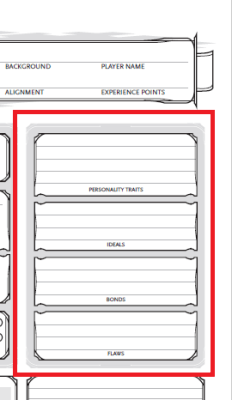
Character Traits

Location:  Upper right, just below the general information

Character Traits.png

These are here mostly for roleplaying purposes.  They have no direct mechanical effect on gameplay or rolls (at least in Adventurers League), but DMs sometimes hand out inspiration if you do things that particularly adhere to these traits.  This is here so your characters have more life and personality at the table, instead of being cardboard cutouts with stats.

Note:  If you play at a non-AL table, DMs may factor these into the gameplay more, and start wrapping parts of the story elements around the various characters’ character traits.  I’ve known some to use the flaws section against you… which can be highly entertaining if done well.

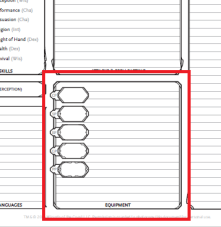
Equipment

Location: Bottom center

Equipment.png

At least when you first make your character, all equipment you are carrying should be listed here.  I highly recommend getting or making a separate inventory sheet.

Features and Traits

Location: Bottom right corner

Features and Traits.png

This is where all of your class abilities should be listed.  I highly recommend listing the book’s abbreviation and page number for each one, as a lot of them are too wordy to write out here.

D&D AL Tips Part 2: Between Sessions

This section is focused on recommended time with your character sheet between sessions.  As you gain experience (as a player, not as a character), you likely won’t need to spend quite as much time on this, but you should still probably check back on these every so often, particularly with:  new characters, levelling up, and coming back from a long absence.

Note:  Some of the notes I’ll make will refer to using the rulebooks under the assumption that you have your own.  I understand that not everyone can readily obtain their own copies of rulebooks, particularly when they are deciding whether they like the game.  If you don’t have your own rulebook, I recommend doing what you can to arrive early and go through these steps by asking to borrow a book from one of the other early arrivals at the table until the session gets going.  I’m making a note here so I don’t have to keep repeating myself.

Between Sessions:

Take Time to Learn Your Character

Take time to look over your character’s abilities and make sure you understand how they work.  If you have questions, write them down and ask the DM for clarification after you’ve tried to look up answers for them in the rulebook first.  If your group has a discord or other way of communicating out of game, ask on there between sessions if you can.  I hesitate to recommend using sources further from the table, as some are good and some are full of bovine excrement.  Overall, remember Rule Zero: the DM has final say and judgment about the game they are running.

For a lot of abilities that would be tedious to write out in the abilities section of the character sheet, I recommend reading over the full ability in the book, and marking your character sheet with the ability name, book it came from, and page number.  ESPECIALLY if you are using a +1 rulebook to go with the standard PHB rules for characters.

Spellcasters, Prepare Your Spellbooks

I HIGHLY recommend that you find or create a reference for your spells if you play a spellcaster. And have that reference open to the correct spell BEFORE your turn comes around.  Waiting for people to look up spells after someone has already said what spell they plan to cast drives the rest of the table bonkers.  Starting out, I highly recommend keeping a copy of the Player’s Handbook nearby when gaming, so you don’t have to hunt down a book in the middle of the game.  Lately, I mostly use the spell cards Wizard’s of the Coast makes for convenience (though they are frustratingly expensive).  In some cases I go a bit overboard, trading time in place of money.  I wrote my current character’s spellbook out, only writing down the spells the character had and keeping them sorted by spell level.  If you build your own reference like I did, I highly recommend keeping notes for the correct book and page number.  There are often times when the DM will call into question the exact wording of a spell description and ask you to look it up in the official rulebook.

Normal Wizardry:

normal wizardry.jpg

Expensive Wizardry:

expensive wizardry.jpg

WHY DO YOU DO THIS TO YOURSELF?

spellbook.jpg

spellbook3.jpg

Keep Your Character Sheet Up To Date

If your character is supposed to level up, make sure you level it up between sessions (if possible) so you don’t lose valuable play time to level your character.  This is a lot more flexible in homebrew, but in Adventurer’s League we’re on the clock, particularly with Season 8’s rules.  Also, game stores throw us out at closing time.  Their employees need sleep too.
Oh, and make sure your inventory is right.  I’m banging my head against a wall myself for not having kept some stuff up to date as I went along.  I was recently trying to make sure my character stable was ready for the next game night, and I didn’t appear to have transcribed some of the inventory from the logsheets to the actual inventory page.  D’oh!

Reflect on the last session

This feels a bit odd to put in here, but I recommend thinking about the last session at some point before the next one.  What worked, and what didn’t work?  If there were player/character conflicts at the table, think on why they happened, and if there is anything you can do to resolve it or work around it.  I won’t harp on this too much, but I think it can be productive to at least think about sessions in between.

Examples:

Someone with a low AC was ambushed from behind.  Would changing the party marching order help?

The party was blindsided by a trap.  How could you increase your chances of finding and disabling that kind of trap in the future?


Spending a little time between sessions helps us all maximize our gaming time, and reduces headaches.

D&D AL Tips Part 1: At the Table

A lot of people, myself included, started playing Dungeons and Dragons Adventurers League for a somewhat low-pressure, drop-in drop-out roleplaying experience.

Wizard’s of the Coast provides resources for it here.

For new and old players alike, here are some recommendations for players to keep the game fluid and moving.  I’d call them “my” recommendations, but as is the nature of the hobby, this is a mixture of things from my experience and things I learned from others, whether at the table or through online media and interactions.  It’s okay if you don’t get through all of this in the first few games, but I highly recommend going through this.  It will make your gameplay smoother… and reduce the grumblings of the grumpier older players at the table (sadly, myself included in this).  I’m breaking this into a three part series, starting at the table, where your actions have the most immediate impact.


Part 1: At the table:

Pay attention to the other players’ actions

I know this can be difficult, particularly in large groups, as it takes a while to get through initiative back to your turn.  If someone has to keep recapping what has been going on, it just gets longer.  Also, players will sometimes announce try to position themselves tactically, creating openings for you to exploit.  Someone might try to set you up for a flanking attack for advantage for both of you, but if you don’t hear them announce that or don’t notice it, you might miss it.  While you are watching, be thinking of what actions you are likely to take on your next turn, so you are ready to go when your initiative comes up.


Roll attack and damage dice together

If you plan to attack on your turn, make sure you know what your attack roll and damage roll stats are.  Go ahead and get the dice out for both before your turn.  Grab your second D20 for advantage if you would have advantage on the attack.  Have this ready before your turn if possible.

I know this seems weird, and I’ve been told it seems presumptuous, but it really makes the game go faster to roll the damage with the attack.  It forces the player to have their whole action ready.  I’ve seen a lot of little increments of time get wasted in the “stumble,” where players roll their attack, have to be reminded of their damage roll, have to search for the correct dice, and then find their modifier again.  I see this most often with newer players, but it also trips up veterans.  By getting out your damage die at the same time as your attack die it forces you to mentally “preload” your action by looking at your stats in advance, so you know exactly what to roll.  Heck, keep your finger on your attack stats if it helps you.  That way you are ready to go on your turn, and can get right to the action!

dice


Have your spells ready

If you plan to use a spell, look it up before your turn.  Have your reference material or rulebook out to the spell you intend to cast before your turn.  Glance over it.  Know what you are planning to do before your turn.  Look up the relevant spell save DC or attack modifier, and get your damage dice out.  A lot of gameplay time is lost from spellcasters having to look up their spells and it taking forever.  I used to be (and still occasionally am) that guy myself, driving my table nuts trying to find the spell description.  If we think ahead, we can light the room up with our fireballs quickly, adding an explosive demonstration of ULTIMATE MAGICAL POWER (MWAHAHAHAHAHA), rather than “um… how does this spell work again?  Give me a minute to… oh, wrong book, hold on!”

Fireball.jpg

ULTIMATE ARCANE POWAH!

Unprepared Wizard High.jpg

“I’ve almost got it.  Guys?”


Keep Your Logsheets Up To Date

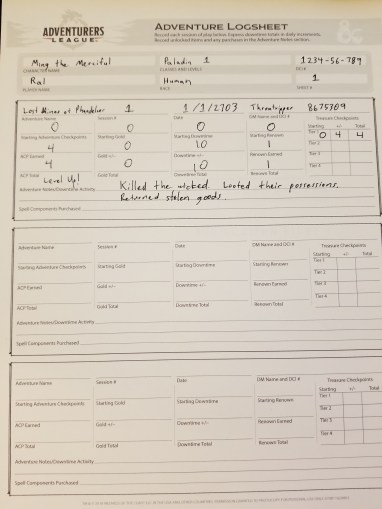
This is adventure league.  In the name of fair play in this format, you are required to maintain logsheets as you adventure.  Blank logsheets are posted free online, and people usually carry some spares if you are new and/or you forget to keep enough on hand.

Go ahead and fill out your log throughout the gameplay session.  Note any instances of money or items gained or lost in the notes.  In particular, update the rewards at the end of the session.  As you get more experienced you may pick up on things you realize you’ll need to remember later, so write those down too.  Odds are you’ll forget what you were supposed to have if you leave the game table before filling out the sheet and have to figure it out the next week.

There is a lot of information that is asked for, but a lot of it is simplified in Season 8.  The rewards are listed in the Player’s Guide for Adventurer’s League, unless the DM specifies otherwise.  As usual for most things D&D, ask your DM for help if you have any questions.  An experienced player may also be able to help you.

20190304_213956.jpg

Justice is served.  And logged.


Next time is Part 2: Between Sessions